Getting protected takes minutes and no technical know-how. Here's exactly what happens once you sign up — how we get set up on your device, how we keep everything patched automatically from then on, and the plain-English report you receive every month.
No jargon, no fuss. You sign up, we get set up, and from then on your updates just happen — quietly, in the background.
Get in touch and tell us which devices you'd like us to look after. There's no minimum number of devices and no long contract — just pick what you need and we'll take it from there.
Next we get our lightweight update agent onto your device. There are two easy ways to do it — run a single command we give you, or simply double-click an installer file we send over. Either takes about a minute and needs no technical know-how. Full detail on both is just below.
As soon as the agent is installed, your device shows up on our portal and we can see every application installed on it — Windows itself plus all your everyday third-party apps. That's how we know exactly what needs keeping up to date.
We then set up automation so that your operating system and every installed application are kept up to date automatically, from that point on. New security patches and app updates are applied quietly in the background — you don't have to lift a finger or remember a thing.
Each month you receive a clear summary of every update we installed that month — and, importantly, how many known vulnerabilities (CVEs) we closed in the process. It's plain-English proof that your devices are being kept safe. There's an example further down this page.
Installing the agent is quick and completely safe. Choose whichever suits you — the result is exactly the same.
Example only — we give you the exact one-line command to copy and paste.
Not comfortable with a command line? No problem. We'll send you an installer file instead — just double-click it, click through, and you're done. It's the same friendly process as installing any other program, and there's nothing to configure afterwards.
Occasionally an update refuses to install cleanly — it happens. When it does, we don't just move on and leave it. We pull the logs straight from the device, investigate exactly why the install failed, put the underlying problem right and get the update installed properly. You don't need to notice or do anything — we handle it, so nothing quietly slips through the cracks.
This is a real example of the report we send — an example of how we kept one customer safe for a single month. The customer name and device names are blurred for privacy.
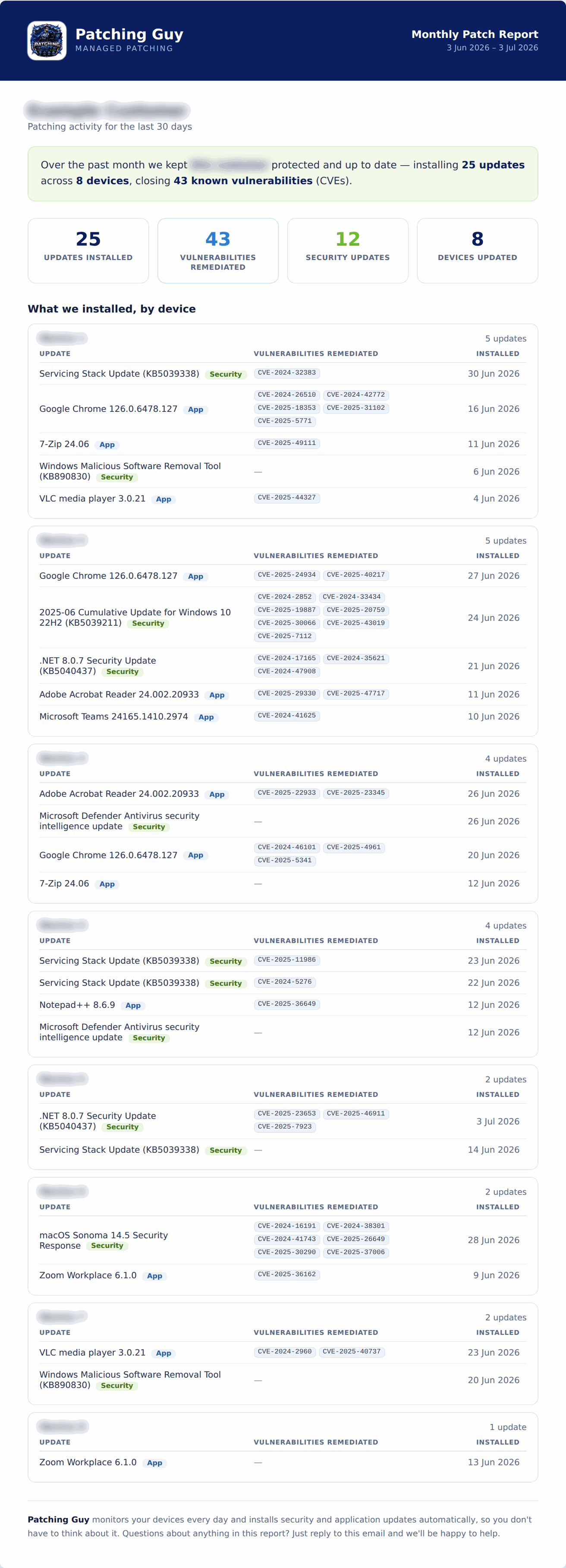
In this single month we installed 25 updates across 8 devices — closing 43 known vulnerabilities (CVEs), including 12 security updates. Every update is listed device by device, so there's no guesswork about what's protected.
Sign up today and we'll have you set up in minutes — then keep your devices patched and safe, month after month.
Start Free Trial